Skate Space
DRSV, LLC.Sports
4.52.07K Reviews
- Version
- 1.498
- Installs
- 10.00M
- Age Rating
- Everyone
Screenshots
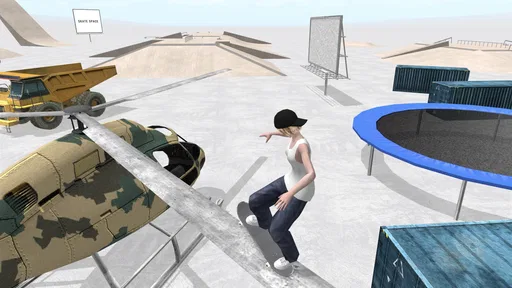
Our Review of Skate Space
 Analysis by Appyee
I went into Skate Space expecting a quick skateboarding game and found something closer to a social playground. The basic appeal is easy to understand: choose a park, practice movement, and spend time skating around spaces built for online sessions. What makes it interesting is the balance between immediate play and the temptation to keep improving. You can enjoy it casually, but the game also gives more dedicated players reasons to return and refine how they move.
It is a free sports game from DRSV, LLC., rated for Everyone. Its audience is broad, although the controls and online focus mean younger players may still need sensible supervision when using multiplayer features. The game has passed the stage of being a niche experiment, with over ten million installs and an average rating of 4.5 from around thirty-one thousand ratings. Those figures match my impression that this is a well-established mobile skating option rather than a tiny one-off release.
Learning the basics without losing the fun
The first useful goal is simply becoming comfortable on the board. Skateboarding games often look simple until you need to combine direction, timing, balance, and camera control. Here, I found that the early minutes are best spent treating the park as a practice area instead of immediately chasing impressive lines. Learning how the character responds gives you a much better foundation than repeatedly attempting difficult moves without understanding the controls.
That early freedom is important because Skate Space does not need to overwhelm you with a long explanation before you can play. I could enter a park, move around, test jumps, and gradually understand what was possible through direct experimentation. This makes the game approachable for someone who has never played a mobile skating title, while experienced players can begin looking for routes and combinations almost immediately.
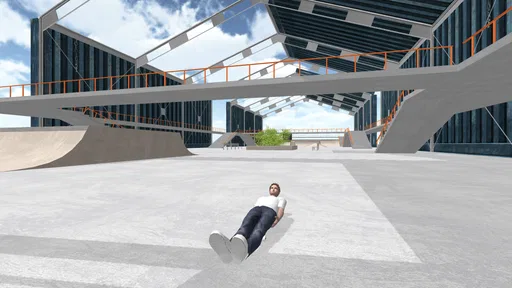
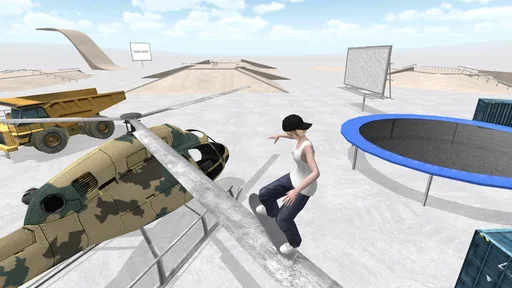
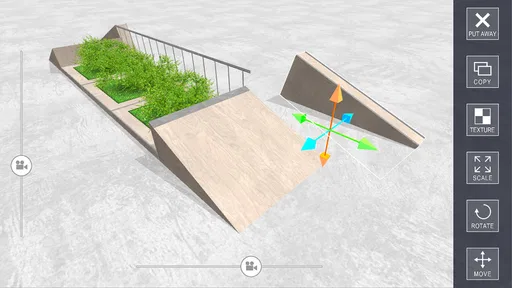
The many custom parks are central to that experience. They prevent the game from feeling like one fixed course that becomes familiar too quickly. A new park changes the question from “Can I land this move?” to “How does this space want me to skate?” Some areas may encourage a clean run through ramps and rails, while others are more enjoyable as places to explore and improvise.
That variety also creates one of the game’s less obvious strengths: the same skill can feel different depending on the environment. A player who struggles with a move in one park may discover that another layout makes the timing easier to read. I recommend using the parks as a way to diagnose your weaknesses. If you keep missing a trick, change the surroundings rather than assuming you simply need to repeat the same attempt forever.
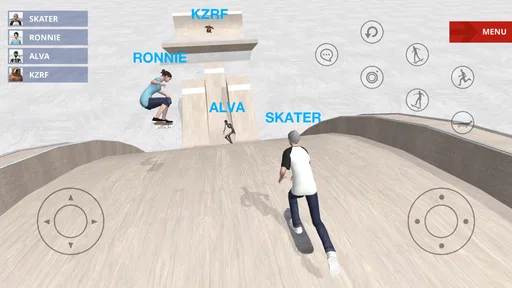
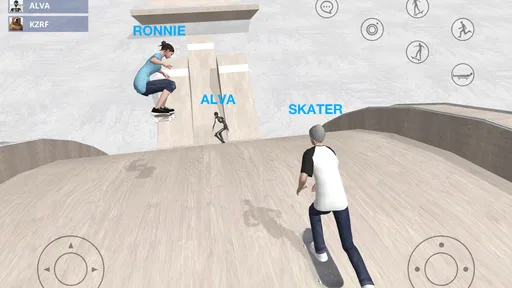
The online session format adds another early goal beyond personal control. Sharing a park with other players changes the atmosphere, even when nobody is directly competing. You begin to notice routes, stylish movement, and the way other skaters use the same environment. For me, that made practice feel less isolated than in a traditional single-player skateboarding game.
What keeps progress visible
Skate Space is most satisfying when you create your own short-term targets. The game’s appeal is not limited to reaching a single finish line. I could decide to learn one movement, complete a cleaner run, find a better line through a park, or simply become more consistent. These goals are modest, but they suit the freeform nature of the game and make improvement easier to notice.
This is also where expectations matter. If you need a heavily structured career mode with a constant sequence of missions, the experience may feel loose. The game is better at giving you space to play than at forcing a precise route through progression. I see that as a deliberate part of its identity, but it will not satisfy everyone equally.
The custom-park approach gives progression a practical shape. Instead of measuring your enjoyment only through formal unlocks, you can use new environments as fresh tests. A park with unfamiliar ramps can expose gaps in your control, while a familiar layout lets you judge whether your line has improved. That makes replay value depend partly on your willingness to set personal challenges.
A useful routine is to divide a session into three stages. I start by warming up in a familiar area, then move to a park that presents a specific difficulty, and finish by returning to the first area to see whether the practice made a difference. This turns a loose skating session into a small training loop without making it feel like homework.
The online element can strengthen that loop. Seeing other players use a park may give you ideas for approaches you would not have considered. It can also make you more aware of your own habits: perhaps you always choose the safest route or repeat the same trick because it is reliable. Watching a busier session encourages experimentation, although players who prefer quiet solo practice may find the social setting distracting.
Because the game is free to download, the barrier to trying this routine is low. There are in-app purchases ranging from under one dollar to around twenty dollars per item, so I would approach spending carefully. The important question is whether a purchase adds something you genuinely want, rather than treating it as a shortcut to enjoyment. The core appeal comes from skating, exploring parks, and improving your control; spending should not be the reason you keep returning.
How the challenge develops
The difficulty curve feels less like a straight staircase and more like a collection of self-selected steps. You can stay in a comfortable park and enjoy relaxed movement, or deliberately choose a layout that demands better timing. That flexibility is helpful for mixed audiences, because beginners are not forced to perform at an advanced level before they understand the game.
The trade-off is that the game may not always tell you exactly what challenge to pursue next. I sometimes had to create my own standard for success. For one session, that might mean landing a particular sequence without a mistake. For another, it could mean finding a smooth route that looks good rather than one that merely reaches the end quickly.
This makes patience more important than reflexes alone. A failed attempt is not necessarily wasted if it reveals where your timing breaks down. I found it more productive to change one part of a run at a time instead of constantly switching techniques. Adjusting the approach, camera angle, or speed in small steps makes improvement easier to identify.
Players who enjoy technical mastery will probably get more from this than players looking for instant spectacle. The game rewards repetition, but not mindless repetition. You need to pay attention to how the board reacts and how the park’s shape affects your choices. That learning process is the real challenge, especially once the novelty of simply moving around has faded.
There is also a social difficulty that does not depend on formal competition. In an online session, you may feel pressure to perform when other players are nearby. I found that this could be motivating, but it could also make experimentation feel less comfortable. The best solution is to separate practice from showing off: use quieter moments to learn, then treat public sessions as a chance to apply what you already know.
For a short everyday session, the game works well after a break, during a commute, or when I have only enough time for a few attempts. A realistic routine would be opening it for ten minutes, choosing one park, and focusing on one movement rather than trying to master everything. The controls and open-ended structure support that kind of bite-sized play, provided you are comfortable setting your own target.
Where the return loop works—and where it can weaken
The strongest reason to return is the combination of new spaces and personal improvement. Custom parks give exploration a fresh layer, while multiplayer sessions make familiar areas feel less static. If you enjoy comparing your own runs, discovering routes, or practicing stylish movement, the return loop can remain enjoyable for a long time.
The weaker side is the possibility of losing direction. Without a clear personal objective, a session can become a sequence of wandering attempts that feel similar. I would not recommend opening the game expecting it to provide a tightly scripted agenda every time. It is more rewarding when you arrive with a small intention, such as learning a line or testing a different part of a park.
Retention pressure also comes from the temptation to chase perfection. That can be satisfying in moderation, but it can turn a relaxed sports game into a frustrating routine if every mistake feels unacceptable. I found that switching parks helped prevent burnout. A new environment gives you a reset and reminds you that the point is not only to repeat one difficult action until it works.
In-app purchases are another factor worth considering before committing to long-term play. Since individual items can cost from $0.99 to $19.99, I would set a personal spending limit and avoid buying impulsively during a frustrating session. The free entry point makes testing the game straightforward, and that trial period is enough to discover whether the skating itself holds your attention.
The game’s age rating of Everyone makes it accessible as a family-friendly sports title, but the online-session design still means the social side deserves the same practical awareness you would apply to any multiplayer game. If you are choosing it for a child, I would focus on the skating mechanics first and make sure the child understands how to use online spaces responsibly.
Who will enjoy Skate Space most?
I would recommend it to players who like expressive movement, open-ended practice, and the feeling of sharing a virtual skate park with others. It is especially suitable if you enjoy making your own goals instead of being guided through a fixed campaign. Someone who wants a casual game can dip in briefly, while a more committed player can spend time learning lines and handling more demanding parks.
It is less suitable for anyone seeking a realistic skateboarding simulation with deep career management, a strongly narrated progression path, or a clearly ordered set of challenges. It may also disappoint players who need constant rewards to maintain interest. The game’s pacing depends heavily on whether you enjoy the act of skating itself.
Compared with a conventional arcade sports game, this feels more like a shared activity space than a sequence of matches. There is less emphasis on a single score-driven contest and more on movement, environments, and self-directed practice. Compared with a purely solo skating game, the multiplayer sessions add atmosphere and unpredictability, although they may also make the experience less controlled.
One practical tip is to avoid judging the game after only a few chaotic minutes online. Start in a park where you can move without pressure, learn the basic response of the board, and then enter a session once you have a simple line in mind. That small change makes the game feel more deliberate and helps you understand whether its freeform design suits you.
My progression verdict
Skate Space succeeds because it treats progression as a combination of skill, discovery, and personal goals rather than relying only on a rigid ladder. The early goals are easy to create, the parks provide visible reasons to explore, and the difficulty can be adjusted by choosing how ambitious you want to be. That gives the game a comfortable range, from casual movement to focused practice.
Its limitations are tied to the same design. Players who need constant direction may find the pacing too open, and the online format is not ideal for someone who wants a completely private experience. The purchase range also makes it sensible to try the free version first and decide whether additional spending is worthwhile for your own play style.
The current version is 1.494, and the game has been available since May 30, 2019, which helps explain why it feels like an established part of the mobile sports landscape. It supports Android devices running version 7.0 or later, making it accessible to many older phones as well as newer ones.
My final view is positive, with one clear condition: Skate Space is best when you treat it as a skate playground, not as a tightly scripted career game. I would recommend installing it if you want freeform skating, custom parks, and online sessions that let you practice or show personality. If your ideal sports game must constantly tell you what to do next, another option will probably serve you better.
For me, the lasting appeal comes from the small improvements: a cleaner route, better timing, a more confident approach to a ramp, or the discovery of a park that changes how I play. Those moments are not flashy in the way a traditional competitive game can be, but they are exactly what makes this particular mobile skating experience worth returning to.
Privacy and Permissions
See what permissions an app requests and how it handles your data.
- Other
- view network connections, full network access, prevent device from sleeping
Verdict
Strengths of Skate Space
- Smooth skating controls are easy to learn on touchscreens.
- Large customization options let you create a distinctive skater and board.
- Online spaces make it fun to show off tricks and meet other players.
- Trick variety supports creative lines instead of limiting you to basic moves.
- Regular challenges give experienced players reasons to keep practicing.
Limitations of Skate Space
- Some advanced tricks require precise timing and can feel difficult on mobile.
- Online features may be less enjoyable when matchmaking rooms are quiet.
- The game can use considerable storage after downloading extra content.
- Progress may feel slow if you prefer unlocking items without repeated play.
- Performance can vary on older devices, especially in busy multiplayer areas.
Other Releases by DRSV, LLC.
View All
BMX Space
Sports4.6

Scooter Space
Sports4.6
Similar Picks in This Category
View All
8 Ball Pool
Miniclip.com4.8

Pooking - Billiards City
AIM TOP GAME TECHNOLOGY LIMITED - pool4.6

Carrom Pool: Disc Game
Miniclip.com4.4

EA SPORTS FC Soccer Mobile 26
ELECTRONIC ARTS4.6

World Soccer League
mobirix4.3

Soccer Cup 2026: Football Game
INLOGIC SPORTS - football tennis golf soccer4.3
Frequently Asked Questions
What is Skate Space?
Skate Space is a multiplayer skateboarding game for mobile devices where you can practice tricks, explore skateparks, customize your skater, and compete or socialize with other players online. It focuses on creative skating rather than a fixed story campaign, giving you room to build lines, learn combinations, and express your style through different boards, outfits, and park designs.
Can I play Skate Space offline?
Skate Space is primarily designed as an online experience, so an internet connection is generally required for its multiplayer features, account functions, updates, and access to community content. Some skating or practice activities may be available with limited connectivity, but players should not expect the complete game to work offline. A stable connection is recommended for smoother sessions.
Is Skate Space free to download and play?
Skate Space can be downloaded without an initial purchase, allowing players to try its core skating experience before spending money. However, the game may include optional in-app purchases for cosmetic items, customization options, or other convenience features. These purchases are not necessarily required to enjoy skating, but users should review the store details and parental controls before downloading.
Does Skate Space support multiplayer and user-created skateparks?
Yes, multiplayer interaction is one of Skate Space’s main attractions. Players can meet others, skate together, show off tricks, and explore content created by the community. The game also emphasizes personalization and park creation, letting users design spaces that suit different skating styles. Online features may depend on the game version, servers, and a reliable internet connection.
What devices are compatible with Skate Space?
Compatibility depends on the version available through the Android or iOS app store, as well as your device’s operating system, available storage, and hardware performance. Because Skate Space includes 3D environments and online functionality, older phones or tablets may experience lower frame rates, longer loading times, or limited visual quality. Check the official store listing before downloading to confirm requirements.
Play our best games!


